
Guided visitor experience
Walk through SOTE one stop at a time.
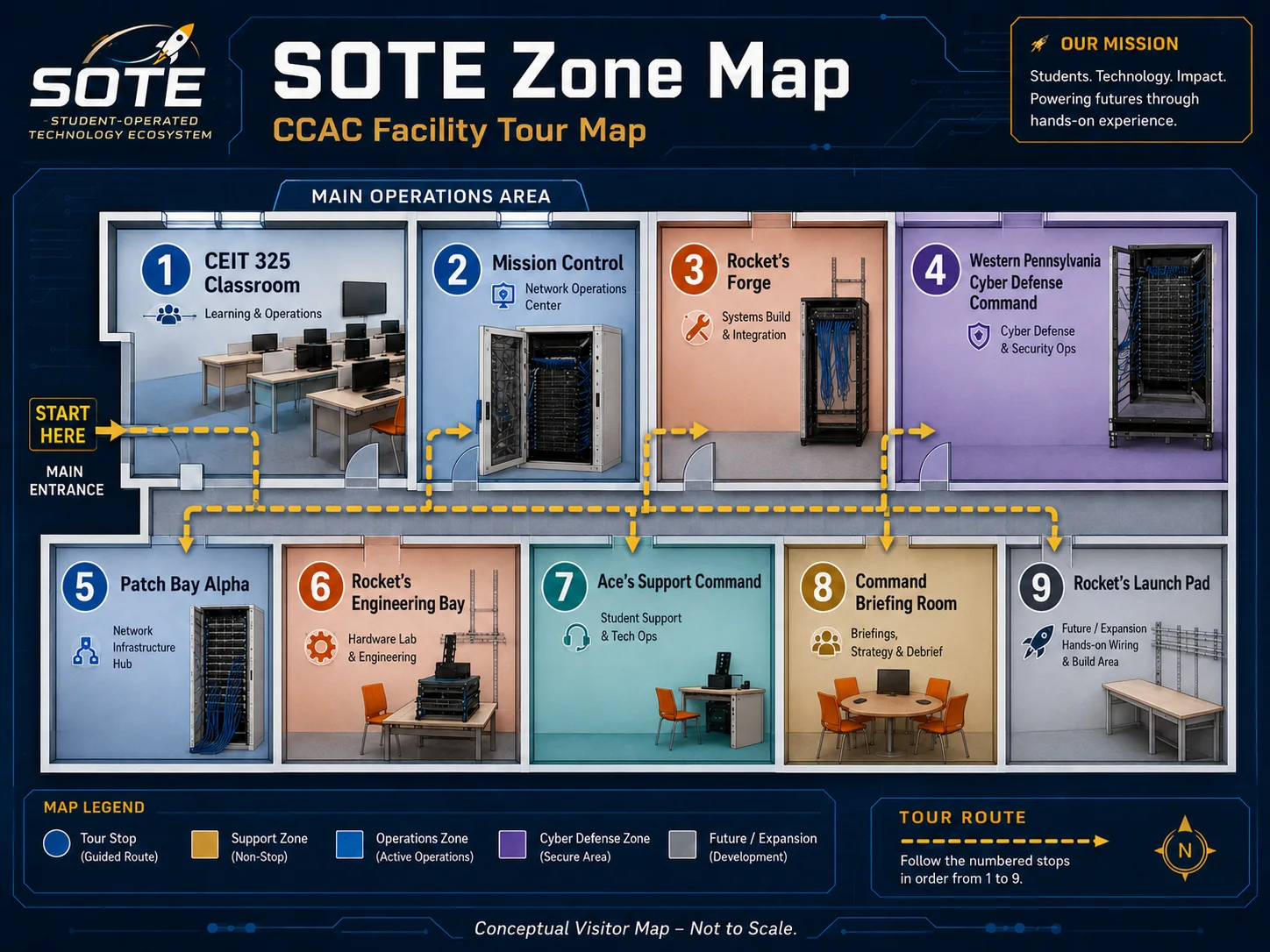
Tour Mode now works like a narrated route: start at the digital front door, enter the classroom and Mission Control, meet the support and engineering spaces, cross into cyber defense, and end with student badges and portfolios.
Front doorOperationsEngineeringCyber defenseGuided tour mode
Recovered approved tour visuals
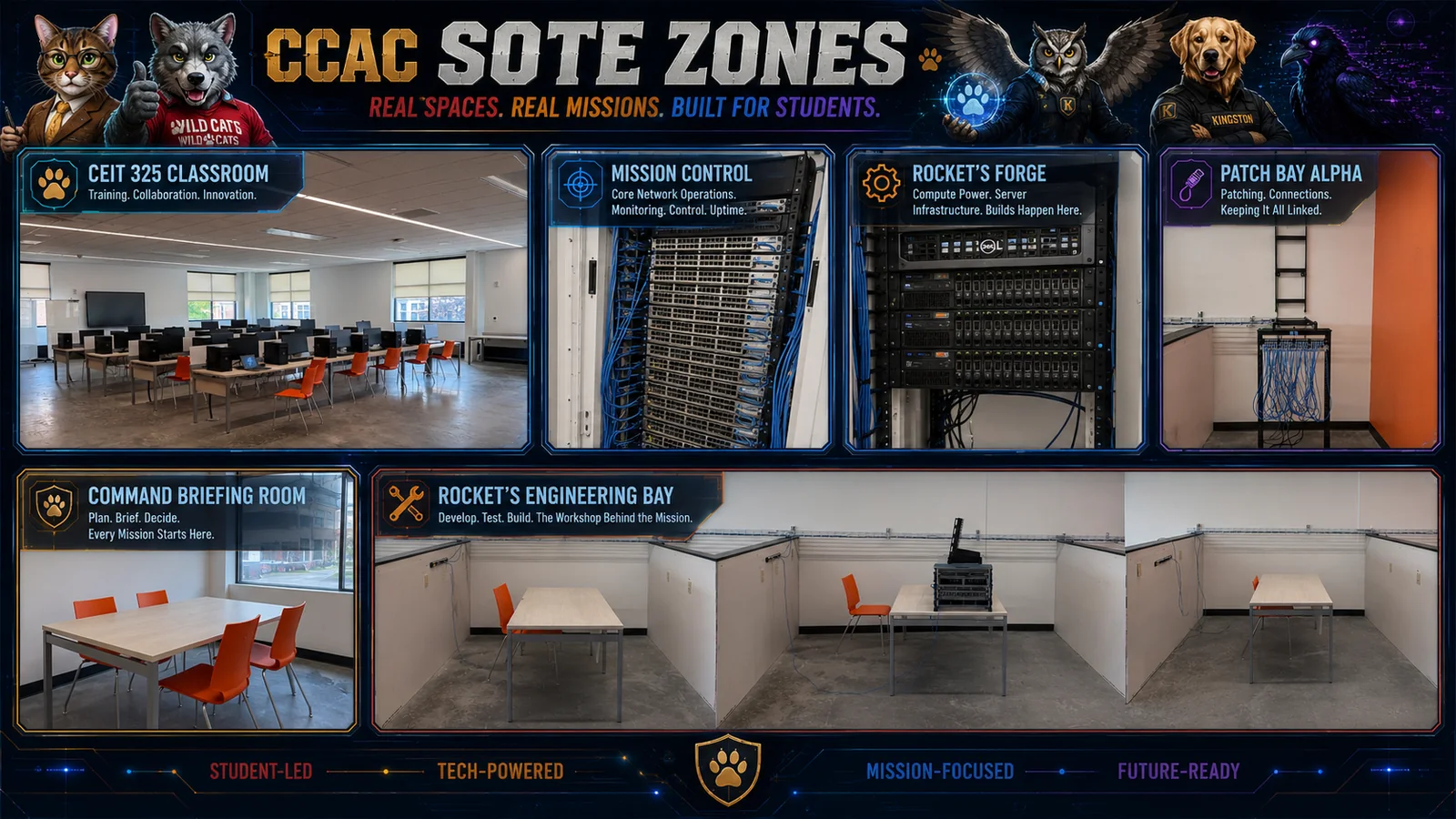
Tour Mode now starts from the approved SOTE facility tour map and zone overview rather than placeholder graphics.
Guided tour sequence
This version behaves more like a walk-through. Choose a stop from the left rail, then move forward using the Next button.
Tour stop
1. Digital front door
Start at the home page. SOTE is introduced as a student-operated ecosystem, not just a collection of equipment. The website gives the project a public identity and a place to store the canon.
Guide language:
“At this stop, we show how the story layer connects to real skills, real spaces, and approved student evidence.”
Tour stop
2. CEIT 325 Classroom
Enter the instructional floor. Student PCs become access terminals into the lab environment, giving learners a safe path into systems, networking, help desk, and cyber workflows.
Guide language:
“At this stop, we show how the story layer connects to real skills, real spaces, and approved student evidence.”
Tour stop
3. Mission Control
Move into the operations center. Mission Control is where students observe, connect, diagnose, and resolve. This is the NOC identity, console access story, and status wall foundation.
Guide language:
“At this stop, we show how the story layer connects to real skills, real spaces, and approved student evidence.”
Tour stop
4. Ace’s Support Command
Meet Ace at the front line. This is where support tickets, communication, triage, user assistance, and workforce readiness become part of the story.
Guide language:
“At this stop, we show how the story layer connects to real skills, real spaces, and approved student evidence.”
Tour stop
5. Rocket’s Forge
Enter the engine room. Professor Rocket connects students to Proxmox, servers, storage, Windows Server, Linux, templates, documentation, and build discipline.
Guide language:
“At this stop, we show how the story layer connects to real skills, real spaces, and approved student evidence.”
Tour stop
6. Engineering and Launch Zones
Step into Rocket’s Engineering Bay and Rocket’s Launch Pad. This is where hardware staging, crash cart work, cabling, terminations, and physical infrastructure missions come alive.
Guide language:
“At this stop, we show how the story layer connects to real skills, real spaces, and approved student evidence.”
Tour stop
7. Cyber Defense Command
Cross into Sir Kingston’s territory. The Cyber Defense Command is the defensive range where students detect, defend, investigate, recover, and face controlled Cypher Raven challenges.
Guide language:
“At this stop, we show how the story layer connects to real skills, real spaces, and approved student evidence.”
Tour stop
8. Student pathway
End with proof of work. Missions become badges. Badges become profile evidence. Profile evidence becomes a workforce story students can explain to employers and partners.
Guide language:
“At this stop, we show how the story layer connects to real skills, real spaces, and approved student evidence.”
Tour ending message
The tour should end by showing that SOTE is not just a place students visit. It is a place where students can build a record of technical growth.
“Students do not simply learn about technology. They operate it, document it, explain it, and turn it into proof of work.”SOTE Tour Mode v0.3